 MANVIA BLOG
Login & Registration
-
Code
required tables: 1) otps, users, site_users
1. UI
1) when the user click on login button, Login / Registration Page will be shown
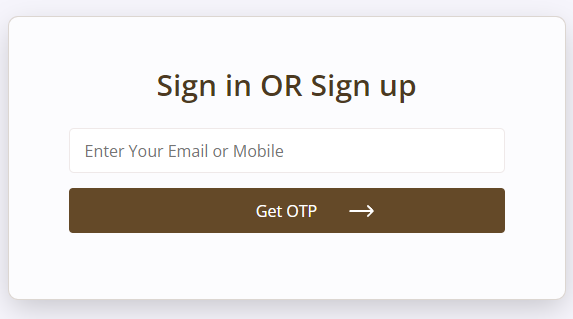
2)User will enter email or mobile and press 'get otp' button, OTP Page will be shown
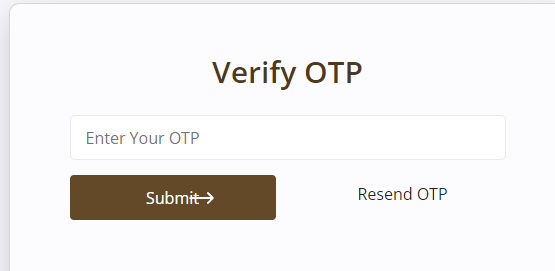
3) User will enter otp and press 'verify otp' button, PROFILE Page will be shown if the otp is valid.
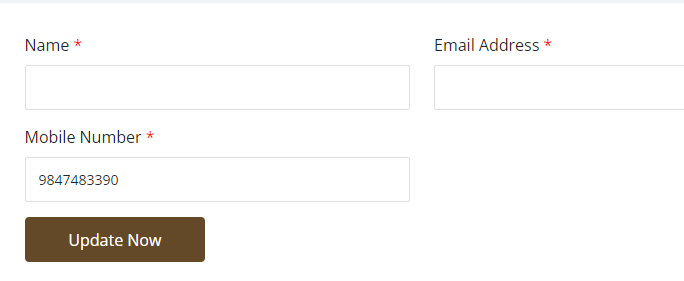
2. Html and Jquery for above UI
We will create two sections. one for showing login form and another for showing otp form. Initially we will show login section and otp section will be hidden
login / registration
                  <section class="log-bg" id="login_panel">
                        <div class="container">
                            <div class="col-lg-6 col-md-6 col-sm-12 main-box ">
                                <h2>Sign in OR Sign up</h2>


                                <form id="loginsubmit" action="#" method="post">

                                                <div class="field">
                                                        <input type="text" id="username" name="username" class="input input-custom" placeholder="Enter Your Email or Mobile">

                                                </div>
                                                <button type="button" id="login" class="btn btn-primary log-btn">Get OTP</button>
                                            </form>

                                        </div>
                                    </div>
                     </section>
OTP page
                            <section class="log-bg" id="otp_panel" style="display:none">
                            <div class="container">
                                <div class="col-lg-6 col-md-6 col-sm-12 main-box ">
                                    <h2>Verify OTP</h2>


                                    <form id="otpFormSubmit" action="#" method="post">

                                        <div class="field">
                                                <input type="text" id="otp" name="otp" class="input input-custom" placeholder="Enter Your OTP">

                                        </div>
                                        <div class="row">
                                                <div class="col-md-6"><button type="button" id="otpsubmit" class="btn btn-primary log-btn">Verify Otp</button></div>
                                                <div class="col-md-6"><button type="button" id="resendOtp" class="btn   ">Resend OTP</button></div>
                                        </div>


                                    </form>

                                </div>
                            </div>
                            </section>
3. switching the sections using jquery
add the code in the javascript
                    $("#login").click(function(){
                            var username=$("#username").val();
                            if(username==''){
                                alert("Please enter email or mobile");
                                return false;
                            }

                            $('#login_panel').hide();
                            $('#otp_panel').show();
                            return false;

                    });
Note that #login_panel & #otp_panel. #login_panel is id of login form section and #otp_panel is id of otp form section 4. send otp from server
1) send a ajax request to server when the user click on the login button
2) write the ajax code in the function $("#login").click(function(){ }
3) use the route 'otp'
4) send csrf token. add csrf in the head tag in the master.blade.php
                        <head>
                            <meta name="csrf-token" content="{ csrf_token()}" />
                        </head>
5) send username to the server
                    $("#login").click(function(){
                            var username=$("#username").val();
                            if(username==''){
                                alert("Please enter email or mobile");
                                return false;
                            }

                            $('#login_panel').hide();
                            $('#otp_panel').show();


                            $.ajax({
                                    type: 'POST',
                                    url: {route('otp')},
                                    headers: {
                                        'X-CSRF-TOKEN': $('meta[name="csrf-token"]').attr('content')
                                    },
                                    data:{
                                        'mobile' :username
                                    },
                                    dataType: 'json',
                                    success:function(data){

                                    },
                                    error: function(xhr, ajaxOptions, thrownError) { // if error occured

                                    }
                                });
                            return false;

                    });
5. create route and controller function for 'otp route' which used in the ajax
1) route/web.php
                    use App\Http\Controllers\fe\AjaxController;
                    ....
                    ....
                    Route::post('/otp', [AjaxController::class, 'otp'])->name('otp');
2) create function in AjaxController.php
3) get the data user sent
$input = $request->all(); 4) user will enter email or mobile number for login or registration
                    if(filter_var($input['mobile'], FILTER_VALIDATE_EMAIL)) {
                        $email=$input['mobile'];
                    }
                    else{
                        $mobile=$input['mobile'];
                    }
5) generate otp number
$input['otp_number'] = mt_rand(100000,999999); 6) check the user entered data in the otp table. If exists, update otp table. If new email or mobile, insert into otp table
                    $otp = Otp::where('mobile', $input['mobile'])->first();
                    if(isset($otp)){
                        DB::table('otps')->where('mobile', $input['mobile'])->update([ 'otp_number' => $input['otp_number'] ]);
                    }
                    else{
                        Otp::create($input);
                    }
7) send otp
                    if(isset($mobile)){
                       // write sms otp code
                    }
                    if(isset($email)){
                        // write email otp code
                    }
8) return json response
                           return response()->json([
                            'status' => "success",
                            'text' => 'Successfully saved',
                        ], 200);
6. Otp verification button event - jquery code
1) write ajax code in the javascript
2) route :otp-verification
3) send csrf token
4) send mobile & otp
5) if the respose data is success, redirect to 'profile' route from javascript
                    $("#otpsubmit").click(function(){
                            var otp=$("#otp").val();
                            var username=$("#username").val();

                            if(otp==''){
                                alert("Please enter otp");
                                return false;
                            }


                            $.ajax({
                                type: 'POST',
                                url: "{route('otp-verification')}",
                                headers: {
                                'X-CSRF-TOKEN': $('meta[name="csrf-token"]').attr('content')
                                },
                                data:{
                                    'mobile' :username,
                                    'otp' :otp
                                 },

                                dataType: 'json',
                                success:function(data){
                                        if(data.status=='success'){
                                            window.location.href="{route('profile')}";
                                        }
                                        else{
                                            alert("Please enter valid otp");
                                        }

                                },
                                error: function(xhr, ajaxOptions, thrownError) { // if error occured


                                }

                            });

                            return true;
                    })
7. route for otp-verification & profile
Route::post('/otp-verification', [AjaxController::class, 'otp_verification'])->name('otp-verification');

Route::get('/profile', [UserController::class, 'profile'])->name('profile');
8. define otp_verification in AjaxController.php
1) function
                    public function otp_verification(Request $request)
                    {

                    }
2) get user sent data
$input = $request->all(); 3) check otp already saved in the otp table
$otp = Otp::where('mobile', $input['mobile'])->where('otp_number', $input['otp'])->latest()->first(); 4) if wrong otp, return error message
                if (empty($otp)) {
                        return response()->json([
                            'status' => "error",
                            'message' => "Wrong otp",
                        ], 200);
                }
4) if otp is valid , check user already in users table with email or mobile
                    if(filter_var($input['mobile'], FILTER_VALIDATE_EMAIL)) {
                        $mobile='';
                        $email=$input['mobile'];
                        $user = \App\Models\User::where('email', $input['mobile'])->first();
                    }
                    else{
                        $mobile=$input['mobile'];
                        $email='';
                        $user = \App\Models\User::where('mobile', $input['mobile'])->first();
                    }
5) create user if not exists
                if(empty($user)) {
                    $user=\App\Models\User::create([
                            'email'=>$email,
                            'mobile'=>$mobile

                    ]);
                }

                <p>6) set session</p>
                <pre><xmp>
                Session::put('user', $user);
                Auth::login($user);
7) return response
                return response()->json([
                    'status' => "success",
                    'message' => "Verified",
                 ], 200);
9. profile route and controller
1) Route
            use App\Http\Controllers\fe\UserController;

            ....
            .....

            Route::get('/profile', [UserController::class, 'profile'])->name('profile');
2) in controller
                public function profile(Request $r)
                {

                        $this->data['user']=User::leftjoin('site_users','site_users.user_id','users.id')
                        ->where('users.id','=',Auth::id())
                        ->select('users.*','site_users.firstname','site_users.lastname')->first();


                        if(isset($this->data['user']) && isset($this->data['user']->firstname)){
                            return redirect()->route('myproducts');
                        }
                        else{
                            return view('fe.profile',$this->data );
                        }


                }
3) create profile.blade and show the user data
10. Update user edited data
1) in route
Route::post('/profile', [UserController::class, 'update'])->name('profile.update'); 2) in controller
    public function update(Request $r)
    {
            $input=$r->all();
            $user=User::find(Auth::id());

            //check the user is already in SiteUser
            $siteuser=SiteUser::where('user_id',$user->id )->first();
            if(isset( $siteuser)){
                $siteuser->update($input);
            }
            else{
                $input['user_id']=$user->id;
                $siteuser=SiteUser::create($input);
            }

            $user->update($input);

            return redirect()->route('profile');


    }
11. Hide 'login' and show' my dashboard'
Hide login button after login
                    //read session
                    $userId=isset(Session::get('user')->id) ? Session::get('user')->id : 0;

                    //check userId in session
                    php if($userId>0){

                    <a href="{route('order.index')}" class="ac-top"> My Account</a>
                    <a href="{route('logout')}" class="ac-top">  Logout </a>
                    php } else{

                      <a href="javascript:void(0);goToPage('Seller','login','profile')" class="ac-top seller mob-none "> Become a Seller</a>
                      <a href="javascript:void(0);goToPage('Customer','login','profile')" class="ac-top login-btn"> Login</a>
                      <a href="javascript:void(0);goToPage('Customer','login','profile')" class="ac-top login-btn"> Signup</a>
                      php
                    }
12. logout
1) create logout route in route/web.php
Route::get('logout', [AjaxController::class, 'logout'])->name('logout'); 2) define logout function
public function logout() { //Auth::logout(); Session::put('user',''); Session::flush(); return redirect()->route('index'); } -
Manage multiple User type : (User or seller)
1. add cookie library at footer for managing cookie
<script src="https://cdnjs.cloudflare.com/ajax/libs/jquery-cookie/1.4.1/jquery.cookie.js"></script> 2. Identify the user type
1) Define a finction and set cookie for user_type
                        function goToPage(type, page, redirect){
                            $.cookie("user_type",type);
                            $.cookie("redirect_url",redirect);
                            window.location.href=page;
                        }
2) apply function to login user & login seller button in the header
                        <a href="javascript:void(0);goToPage('Seller','login','profile')" class="ac-top seller mob-none "> Become a Seller</a>
                        <a href="javascript:void(0);goToPage('Customer','login','profile')" class="ac-top login-btn"> Login</a>
3. set user role in the users table based on the cookie variable user_type
After otp verification, set user role when creating the user
                        $role=Role::where('identifier',ucwords($_COOKIE['user_type']))->first();

                        $user=\App\Models\User::create([
                                'email'=>$email,
                                'mobile'=>$mobile,
                                'role_id' =>$role->id,
                                'section'=>'site_users'

                        ]);